Proxmox Backup Server – Tip of the Day 💡
I’m currently improving the backup strategy for my VM infrastructure running on Proxmox VE.
My dedicated server in Helsinki runs Proxmox VE, while my Proxmox Backup Server is running in my homelab. What I really like is that you can easily connect both environments over a Layer 3 network connection, even when they are located in completely different locations.
Setting it up is surprisingly simple:
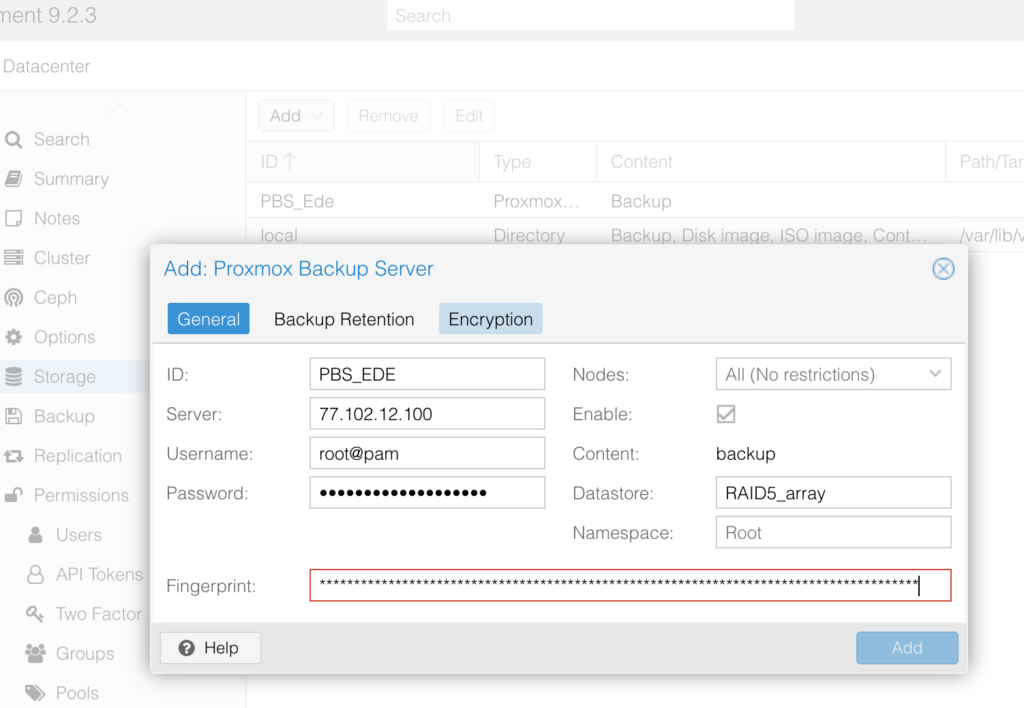
Datacenter → Storage → Add → Proxmox Backup Server
Fill in the required details such as:
ID
Server IP / hostname
Username
Password
Datastore
Fingerprint
And that’s basically it.
Just make sure TCP port 8007 is open and forwarded to your Proxmox Backup Server so your remote Proxmox VE host can connect securely to it.
This makes it very easy to create efficient off-site backups for virtual machines running on a dedicated server, while keeping the backup storage safely at home in your own homelab.
One of the things I really appreciate about the Proxmox ecosystem is how flexible and accessible it is for both homelab and professional environments.
(this IP is just random 😇 )